Elevating the Guest Experience: Samsung Hospitality TVs

In the fast-paced and ever-evolving hospitality industry, providing an exceptional guest experience is paramount. Every element of a guest’s stay contributes to their overall satisfaction, and one crucial aspect is the in-room entertainment. Samsung, a global leader in consumer electronics, recognizes the importance of this and offers a range of cutting-edge hospitality televisions designed to elevate the guest experience to new heights.
Samsung’s hospitality televisions combine advanced technology, stunning visual displays, and smart features to deliver an immersive and personalized in-room entertainment experience. Let’s delve into some key features that make Samsung Hospitality Televisions stand out:
- Superior Visual Quality: Samsung’s hospitality televisions feature state-of-the-art display technologies, including 4K UHD resolution and HDR (High Dynamic Range). These features ensure vivid colors, sharp details, and enhanced contrast, providing guests with a cinematic viewing experience in the comfort of their rooms. Whether guests are enjoying their favorite shows, movies, or gaming, the exceptional visual quality enhances their overall enjoyment.
- Smart TV Capabilities: Samsung Hospitality Televisions are equipped with smart TV functionality, allowing guests to access a wide range of content and services. Built-in Wi-Fi and easy-to-navigate interfaces enable guests to stream their favorite online platforms, such as Netflix, Hulu, and YouTube, directly on the television. Additionally, guests can explore personalized recommendations, browse the internet, or access hotel services, creating a seamless and interactive in-room experience.
- Customizable User Interface: Hotels have the flexibility to customize the user interface of Samsung Hospitality Televisions, enabling them to showcase their branding and tailor the in-room experience to their specific requirements. Customizable welcome messages, hotel information, and branded backgrounds create a cohesive and immersive environment, reinforcing the hotel’s identity and enhancing the guest’s connection with the property.
- Interactive Guest Services: Samsung’s hospitality televisions integrate with hotel guest service platforms, enabling guests to access a range of hotel services directly from their room. Whether it’s ordering room service, requesting housekeeping, or exploring local attractions, guests can easily navigate and interact with hotel services through the television. This streamlined approach not only enhances convenience but also improves operational efficiency for hotel staff.
- Energy Efficiency and Durability: Samsung is committed to sustainability, and their hospitality televisions are designed with energy efficiency in mind. With features like automatic power-off and energy-saving modes, these televisions help hotels reduce their carbon footprint without compromising on guest satisfaction. Additionally, Samsung’s televisions undergo rigorous testing to ensure durability, reliability, and a longer lifespan, providing hotels with a cost-effective and sustainable solution.
- Seamless Integration: Samsung Hospitality Televisions seamlessly integrate with existing hotel systems, making installation and management hassle-free. The televisions can be easily integrated with property management systems, content management systems, and other in-room control systems, allowing hotels to streamline operations and enhance the guest experience.
 Samsung’s commitment to innovation and customer satisfaction has made them a trusted provider of hospitality televisions worldwide. Their extensive product lineup caters to a range of hotel sizes and requirements, ensuring that each property can find a tailored solution to meet their unique needs.
Samsung Hospitality Televisions offer a compelling combination of cutting-edge technology, superior visual quality, smart features, and seamless integration, all designed to enhance the guest experience. By providing a personalized and immersive in-room entertainment experience, hotels can delight their guests, differentiate themselves from the competition, and build long-lasting customer loyalty. With Samsung Hospitality Televisions, hotels can truly take their guest experience to the next level.


 When designing or renovating a classroom, there are several key factors that affect an integrator’s decision in choosing to install a display or a projector. Generally speaking, the decision is based on the room size, seating layout, and light levels of the overall environment – both natural and overhead lighting included.
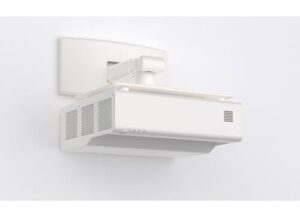 including a 21:9 aspect ratio for hybrid learning and remote collaboration. Perfect for the education space, the projector features a compact design and long-lasting power. Plus, the simple set-up and wall-mounted installation provides crystal-clear images up to 120” with little to no chances of projector shadows from the presenter.
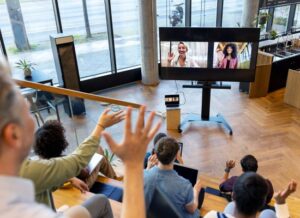 Additionally, we’ve seen an increased demand for both displays and projectors in hy-flex classrooms, which follow a small group-based layout. These learning spaces feature a main projector, or several, at the front of the classroom, but separate students into small groups, each with their own individual display at their meeting table. The professor can walk around the room and supervise the individual groups, with the capability to transmit a video feed from the small group displays to the main projector to share content with the whole class.

 3. Image Position & Adjustment

 An important reminder is to make sure that you convert feet to inches (or vice versa) when doing your calculations. I’m commonly ask to recommend a screen for 125” wide screen that’s being mounted 15’ away. It would not look great for me to recommend a 1875:1 lens here – which is what you get if you don’t convert 15 feet into 180 inches. More commonly, I get requests such as, “I want to use XYZ projector, I have 164-inch diagonal screen and am mounting this 15ft away: which lens do I need?” I don’t know the width, but I do know the diagonal, so I can either ask for the width to be exact, or I can head over to this tool: