Optimizing AV Systems for Hybrid Classrooms: Best Practices for Integrators

The hybrid classroom, where in-person and remote learners connect seamlessly, is now a staple in education. With 67% of college instructors leading hybrid classes in 2023 (up from 52% before the pandemic), this approach is expected to continue growing across K–12 and higher education. As an AV integrator, you’re already aware that a well-designed AV system is key to engaging every student equally. Here’s how to tackle that challenge with confidence.

  1. Prioritize High-Quality Cameras & Flexible Coverage

Opt for PTZ (Pan-Tilt-Zoom) cameras instead of fixed-lens models. They allow remote students to follow the instructor and classroom activity seamlessly. Lumens even suggests avoiding fixed lenses for multipurpose rooms due to their limited coverage.

Best practice suggestions:

    • Choose auto-tracking cameras for hands-free presentation.
    • Allow remote focus and zoom control via a secondary display or control console.
  1. Important: Don’t Allow Poor Audio to End the Class

Clear and intelligible audio is the foundation of effective hybrid learning. Ceiling mounted beamforming microphones, conferencing soundbars, and digital signal processors with (AEC) acoustic echo cancellation are just a few of the possible solutions used to ensure the class sounds as good as it looks.

Best practice suggestions:

    • Consider lapel mics for presenters and ceiling or table mics for students to stay loud and clear. Microphones are just as important as the loudspeakers being used.
    • Route audio through a central DSP with dynamic equalization, feedback suppression, and AEC (acoustic echo cancellation) to help balance out the sound and ensure no unwanted feedback/echo.
    • Room acoustics matter.  Taking into consideration the possible obstacles of reflective surfaces, open ceilings, and unwanted noises in the room will go a long way to stellar performance.
  1. Upgrade Displays and Sharing Infrastructure

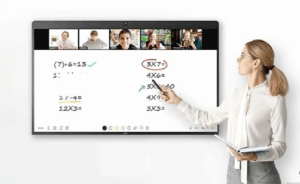
Dual displays, one for content, another for live video feed, help both in-room and remote participants stay engaged. Having the right size displays will ensure everyone in the room can clearly view what is being shown. Interactive whiteboards also boost collaboration, allowing annotations and media sharing in real time.

Best practice suggestions:

    • Use interactive touch screens, or interactive projectors.
    • Consider industry standards when it comes to the recommended display size for a given space.
  1. Fortify Network Reliability

A strong network is non-negotiable. Hybrid systems demand reliable bandwidth and proper Quality of Service (QoS) prioritization to avoid audio dropout or video lag.

Best practice suggestions:

    • Validate network health before installation.
    • Create separate AV VLANs to isolate traffic and maintain stability.
    • Ensure Wi-Fi strength supports classroom needs effectively.
  1. Integrate Seamlessly with LMS and Collaboration Platforms

Ease of use for educators is essential. Sick of manual setup? So are teachers. Make sure your AV design integrates smoothly with platforms like Canvas, Blackboard, Zoom, or Microsoft Teams.

Best practice suggestions:

    • Test both live streaming and on-demand delivery.
    • Tie AV controls into existing classroom software wherever possible.

Why This Matters

Hybrid learning isn’t just a trend. It’s backed by data: over two-thirds of educators now embrace it. When AV systems falter due to poor audio, unreliable cameras, lagging video, remote learners disengage. Your expertise in deploying smart, integrated AV systems can ensure every voice is heard and every lesson matters.

Final Take

By implementing PTZ cameras, dependable audio, dual-display systems, robust networking, and smart integrations, you’ll deliver hybrid environments that feel inclusive, intuitive, and professionally engineered. For AV integrators who stay ahead of these practices, the payoff is improved learning outcomes, and stronger client trust.

Ready to upgrade your hybrid classroom AV? Connect with your Almo team for a free consultation on your next project.

Why Resellers Should Take Advantage of Project Registrations

Let me ask you if you’ve ever experienced this scenario: you’ve been working on a project, specifying every detail and researching and locating the products to meet the project requirements. You’ve quoted the client, and you’re waiting on funding or their next signature. The buyer receives the information, and you learn that they placed the order with another supplier due to lower cost.

Unfortunately, I’ve had that experience with over 25 years in this industry. I want to provide you with a recommendation designed to help minimize these scenarios for the future.

One of the most powerful, and often underutilized, tools available is project registration.

What is project registration?

Project registration is a process that allows a reseller to inform manufacturer (leveraging your Almo team) about a specific opportunity or project. This process provides numerous benefits to both the reseller and the manufacturer, including transparency, pricing protection, forecast of needed products and more.

Let’s dive into the benefits of registering your projects.

Why does project registration matter?

First and foremost, project registration is a simple and effective way to protect your profit. When a project is registered, you’re able to secure your pricing and provide yourself the opportunity to make more margin.

James Calandrillo, Vice President of Almo Pro AV Sales, detailed the importance of project registration, especially with prices on the rise.

“In today’s unprecedented times with price changes due to tariffs, it’s more important than ever to register as many projects as you can, as often as you can,” he explained. “And as pricing changes, active registrations are covered to the end of that, whereas there’s no pricing guarantee if you don’t register the project.”

When you register a project, you’re not just receiving reliable pricing, you’re creating awareness about the intricacies of your project with the manufacturer utilizing your Almo team. Consider it a win for both the reseller, distributor and the manufacturer. The reseller enjoys pricing recognition provided from the manufacturer while both the distributor and manufacturer gain knowledge their products for future forecast.

Taukia O’Donnell, Director of Bid Operations at Almo Pro AV, provided additional details on the importance of project registration in a recent conversation.

“Project registration is a critical tool that empowers resellers to maximize profitability and strengthen partnerships with manufacturers,” she explained. “This not only safeguards margins but also fosters transparency, enabling manufacturers to better understand project needs and market demands.”

Along with pricing recognition, project registration separates the reseller from a simple box sale. Instead, they’re viewed as an actual design-build integrator.

“Project registration elevates resellers from mere transactional vendors to strategic design-build integrators,” Taukia said. “This distinction enhances credibility and deepens manufacturer relationships, creating a competitive edge.”

“If you’re registering projects, it shows the manufacturer that you’re really doing the work,” James added.

Why should resellers leverage Almo for support?

Oftentimes, sales representatives choose not to register their projects simply because they don’t have the time to do it. When dealing with a variety of brands, they don’t have the bandwidth to reach out to vendors themselves and explain their plans.

“Partnering with Almo Pro AV simplifies the process, offering expertise and access to multiple vendors who support registration at low quantities,” explained Taukia. “This support is invaluable for sales teams managing diverse brands under tight schedules.”

Along with expertise, Almo Pro AV is here to ensure an efficient registration process.

“I encourage all resellers to prioritize project registration to protect profits, streamline operations, and position themselves as trusted partners in the supply chain,” said Taukia. “Leveraging Almo’s resources can make this process seamless and highly rewarding.”

I realize we are all very busy, our time and resources are limited. This is definitely one area to take the extra few minutes to register your projects when you’ve spent time to specify the project for your client.  It’s like offering yourself a little added protection from the “last minute low-ballers”. I’m not saying you will do away with the competition, however this process will definitely assist in minimizing the risk for you.

The project registration process is usually quite easy – simply provide the details to your Almo Sales Rep and they will work directly with the manufacturer utilizing Almo’s Bid Registrations. Your Almo sales representative will be happy to assist you in collecting the information to register your projects.

If you have any questions or would like to request to have a project registered on your behalf, please reach out to Almo Sales or myself for assistance.

Angie Greene
About the Author

Angie Greene | DSCE

Business Development Manager

Supported Manufacturers: Panasonic Connect

Case Study: High School Stadium Audio Upgrade

One of the great parts about my job is that I get the chance to work on a wide range of exciting projects, each with their own unique challenges. The particulars of each project help keep me on my toes and ensure that we never apply a “one size fits all” approach. I wanted to share with you a recent high school stadium audio upgrade project that I worked on which is a great example of overcoming challenges – and bringing in external resources to help bring things home.

A customer came to us with an opportunity to upgrade a high school football stadium’s sound system, which was working but in need of a refresh. The existing sound system consisted of a series of Community outdoor loudspeakers mounted above the home side press box:

stadium press box

Although these speakers were functional, attendees were complaining that announcements and music could not be heard over the crowd noise, particularly at larger events with a full capacity crowd, and particularly on the visitors’ stands, which are over 400’ away on the other side of the stadium.

stadium aerial view

My first thought was to add speakers to the light poles on the visitors’ side to improve coverage and intelligibility. However, according to the customer, the school was unwilling to add trenching to the other side for this project, and there were no known pathways connecting the two sides.

With this disappointing piece of news in hand, I knew I needed a second opinion, so I decided to reach out to one of the most capable and helpful people in the industry – Harman’s Dave Tewksbury. Dave is an amazing and knowledgeable resource on all things JBL and BSS, and I knew he could help to find a creative solution.

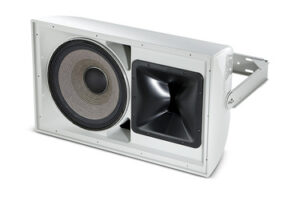
AW566 loud speakersAfter explaining the limitations of the project, Dave surprised me when he stated that JBL’s AW series of speakers (the AW566 in particular) have the ability to project over that distance when paired with the proper amount of amplification.
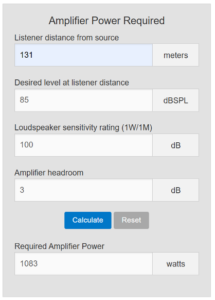
But what is the proper amount of amplification? In order to determine that, we need to have a target sound pressure level at a given distance. Although ideally we would want something above 90 dB SPL to truly overcome all crowd noise, the amount of amplification required to hit that from 430’ away would be both impractical and would overload the speaker.

Together we settled on a target of 85 dB SPL, which according to both Crown’s amplifier power calculator and JBL engineers, would require approximately 1083 watts of power for the AW566:

amplifier requirementsFinally, something we could work with! We settled on the Crown DCi 2×1250 to power (2) JBL AW566 loudspeakers mounted above the press box to provide sound to the visitors’ side. The home side situation was much easier to solve for – it simply required selecting speakers with the appropriate coverage patterns. Those turned out to be (3) JBL AWC82 speakers, powered by a Crown DCi 4×600. We also recommended relocating the home side speakers so that they would no longer be in the acoustic shadow of the press box roof, as the previous Community speakers were.

Through all of this legwork we were able to provide the customer with a reasonably-priced solution to drastically improve the acoustics and intelligibility of their sound system. We were able to navigate challenges which prevented implementing the “ideal” solution, and were able to provide them with an easy-to-implement significant upgrade to their current system.

My thanks as always to the invaluable Dave Tewksbury, as well as all of the great folks at Harman, for their continued support, knowledge, and help!

If you are interested in more information on amplifier power and speaker ratings, Crown has an excellent guide on their website, and if you need help with a complex or challenging audio project, simply send an email to [email protected] and our team of experts will be there to help!

Check out John’s other recent blog: “Digital Signal Processors – a Beginner’s Guide“.
John Rossman - headshot-frame

About the Author

John Rossman | CTS

BDM II – Technical Specialist

Supported Manufacturers: Harman ProfessionalAKG, AMX, BSS, Crown, DBX, JBL, Lexicon, Martin, & Soundcraft

Competitive Esports: What’s It All About?

Over the past few months, I went on a journey to gain a better understanding of Esports. With over 30 years in this industry, my exposure and knowledge level about this new and growing business was very limited at best. Other than the discussions with my niece and attending a few webinars hosted by rAVe’s Gary Kayye, I intended to expand my personal knowledge – and hopefully share some of that information with you.

Over the past few years, Esports has transformed from a niche activity into a global phenomenon, with large audiences, sponsorships, and college programs dedicated to competitive gaming. While Esports is rising in popularity across many universities, the term can still be a bit of a mystery for those who aren’t immersed in the gaming world. Simply put, Esports focuses on competitive video gaming, where players and teams participate in organized tournaments, often with large audiences watching online or live at arenas.

In a recent article about the rapid expansion of Esports, rAVe’s Clara Mello details the large market potential for competitive gaming. Thanks to its expansion into college programs, the gaming market was valued at $187 billion with 335 million players and viewers when rAVe’s article was published.

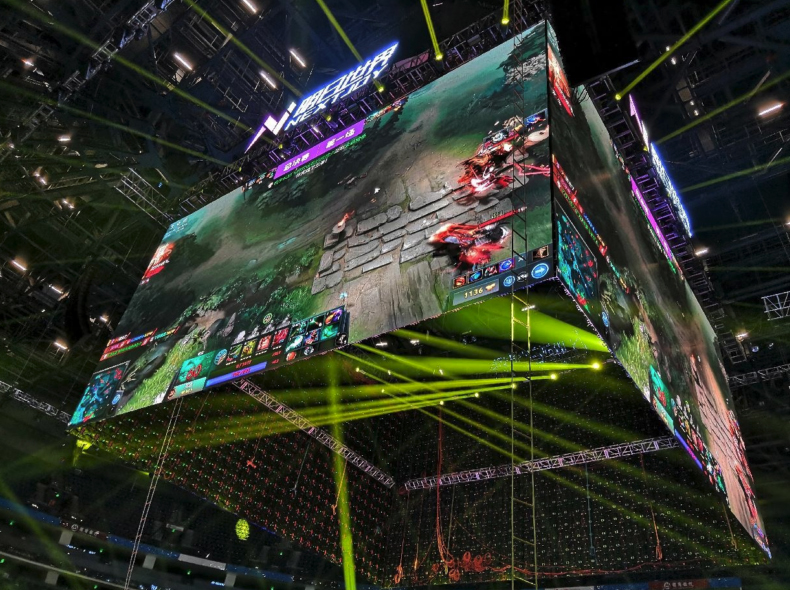
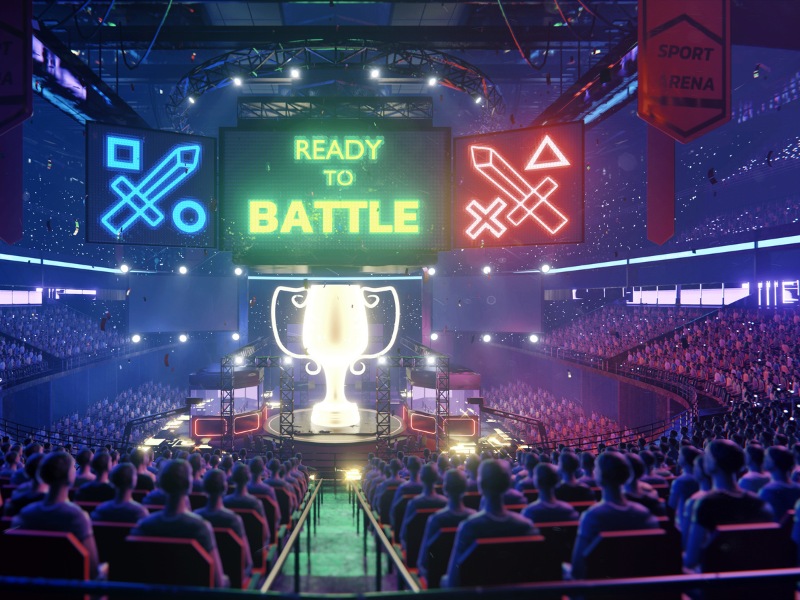
esports-arena-displaysBut it’s not just about the games — there’s a long list of audiovisual technology that helps bring these epic events to life. Let’s take a deeper dive into the world of Esports and discuss how AV solutions are driving this industry.
In conversation with Keith Vidger, Engineering Manager for Pro Video and Audio at Panasonic, we discussed the key factors that contribute to a successful Esports setup. First and foremost, it’s important to differentiate Esports streaming from broadcasting.

“There are many rules and procedures used for broadcasting at conventional sporting events,” he explained. “These rules do not apply when you’re not broadcasting over the air, so there’s no need for delay.”

While the government requires that traditional broadcasts insert several seconds of delay, these rules do not need to be followed when streaming. Instead, streams should have one frame or lower latency. And in competitive Esports, latency and lag are major concerns. With each game requiring split-second decisions, even a few milliseconds of delay can cost players the game.

“Certain applications do not care about lag, but [in Esports,] 3-microseconds versus 2-microseconds of lag could be the difference between winning and losing a game,” Vidger said. “[Traditional] broadcasting caused an unnecessary delay that was detrimental to the game players.”

Additionally, the growing popularity of Esports wouldn’t be complete without the rise of platforms like Twitch and YouTube. Many Esports events are streamed live on Twitch, where millions of fans tune in to watch the action unfold in real time. Pre-recorded events are frequently uploaded to YouTube, where they can be revisited by fans after the event is over.

So, how does the right AV gear enhance an Esports event? Here are a few necessary products that are designed to help these competitions run smoothly and efficiently.

PTZ Cameras

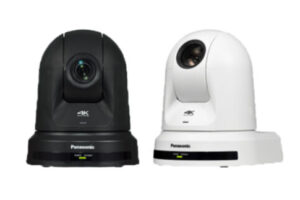
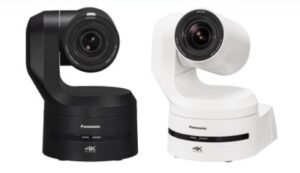
Panasonic Connect PTZ cameras Panasonic’s AW-UE150 and AW-UE160 cameras are excellent choices for Esports events, as they provide crystal-clear images and capture fast-moving gameplay. For smaller setups or more budget-friendly options, the AW-UE30 and AW-UE40 are also great choices.PTZ cameras by Panasonic Connect

Explore the Panasonic PTZ Camera lineup.

Displays

While the players often have access to their own personal monitors during an Esports event, large displays are an essential component of an arena. These displays show the competition to large, in-person crowds and give attendees a close-up look at key moments.

Looking towards the future of competitive Esports, Vidger finds that the largest point of change is in the organization of the sport itself, as there are many different leagues that can employ players and drive revenue. He expects that the scope and reach of these leagues continues to expand, with more university campuses requesting these audio-visuals systems to host competitive Esports events.

Overall, Esports is a fast-growing segment for the AV industry. In my opinion, it’s a very interesting topic, especially if you are not really involved in playing any games. If you’re looking to experience an Esports event, I’d recommend going on Twitch to watch an online stream. This is an area that brings opportunities for all of us to provide equipment for these events. Additionally, Esports also presents itself as a rapidly growing business segment, which will only bring even more discovery of products and services.

This was an educational and eye-opening process for me, and I’ll share some useful links and resources so you can peruse them, too!  With any questions, please reach out to me, your Exertis Almo representative, and/or your Panasonic TAM for assistance.

Resources for You

Angie Greene
About the Author

Angie Greene | DSCE

Business Development Manager

Supported Manufacturers: Panasonic Connect

Esports on Campus: The Role of ProAV in Competitive Gaming

As Esports continues to surge in popularity, college campuses are emerging as key players in the competitive gaming landscape. From campus gaming centers and dedicated arenas to immersive broadcasting experiences, universities are investing in professional audiovisual (Pro AV) solutions to elevate their Esports programs. For systems integrators, this represents a unique opportunity to provide the advanced technology needed to support high-performance gaming environments.

Absen - esports case studiesLet’s explore the key categories of Pro AV technology essential for creating cutting-edge Esports facilities on college campuses and how integrators can play a vital role in the process.
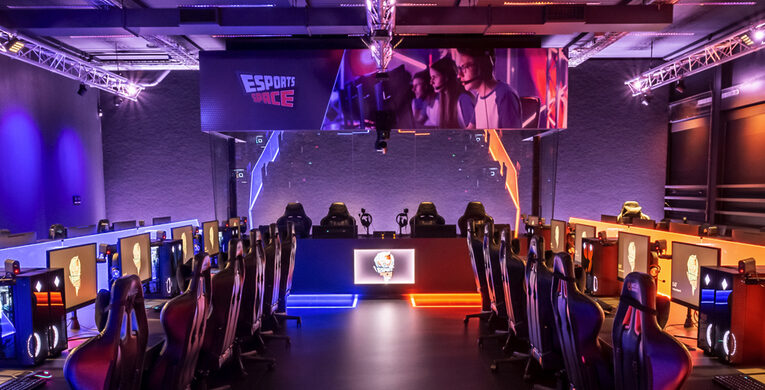
Displays and Video Walls

High-quality displays, including large-format monitors, video walls, and projectors, are essential for both players and spectators. In gaming arenas, video walls allow for large-scale broadcasting of matches, while individual monitors ensure players have the highest resolution and refresh rates for competitive gaming.

The Absen KLCOB Series utilizes professional Micro LED technology for reliable and stable performance that stays cool. Check out these Absen esports case studies.JBL-SRX910LA speaker variety

Audio Systems

Clear and immersive audio is crucial for the player experience and for spectators. Advanced speaker systems and surround sound setups enhance gameplay immersion, while PA systems or distributed audio ensure audiences in live events can hear game commentary and match details.

JBL’s SRX900 Series addresses the growing need for scalable small and medium-format professional sound-reinforcement solutions. The SRX910LA is a two-way active line array element that can cover a variety of mid to large-sized applications. Want to know more? These JBL esports case studies may be of interest.

Broadcast and Streaming Equipment

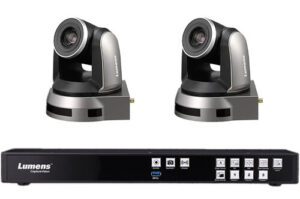
Esports requires robust streaming capabilities. This includes video capture devices, professional-grade cameras, switchers, and encoding hardware for live streaming games to platforms like Twitch or YouTube. Professional lighting setups are also needed for player cams and audience viewability.lc200 bundle 51pb

Lumen’s Media Processor Bundle equips your space with the ability to record, store and stream video content including the LC200 CaptureVision system and PTZ cameras.

Atlona AVoIP case study gaming center

Control Systems and Signal Management

To manage all the audiovisual elements seamlessly, integrated control systems are needed. This includes AV-over-IP solutions for routing signals across multiple screens, gaming setups, and feeds, along with signal processors to ensure smooth transitions between live feeds, game replays, and announcements.

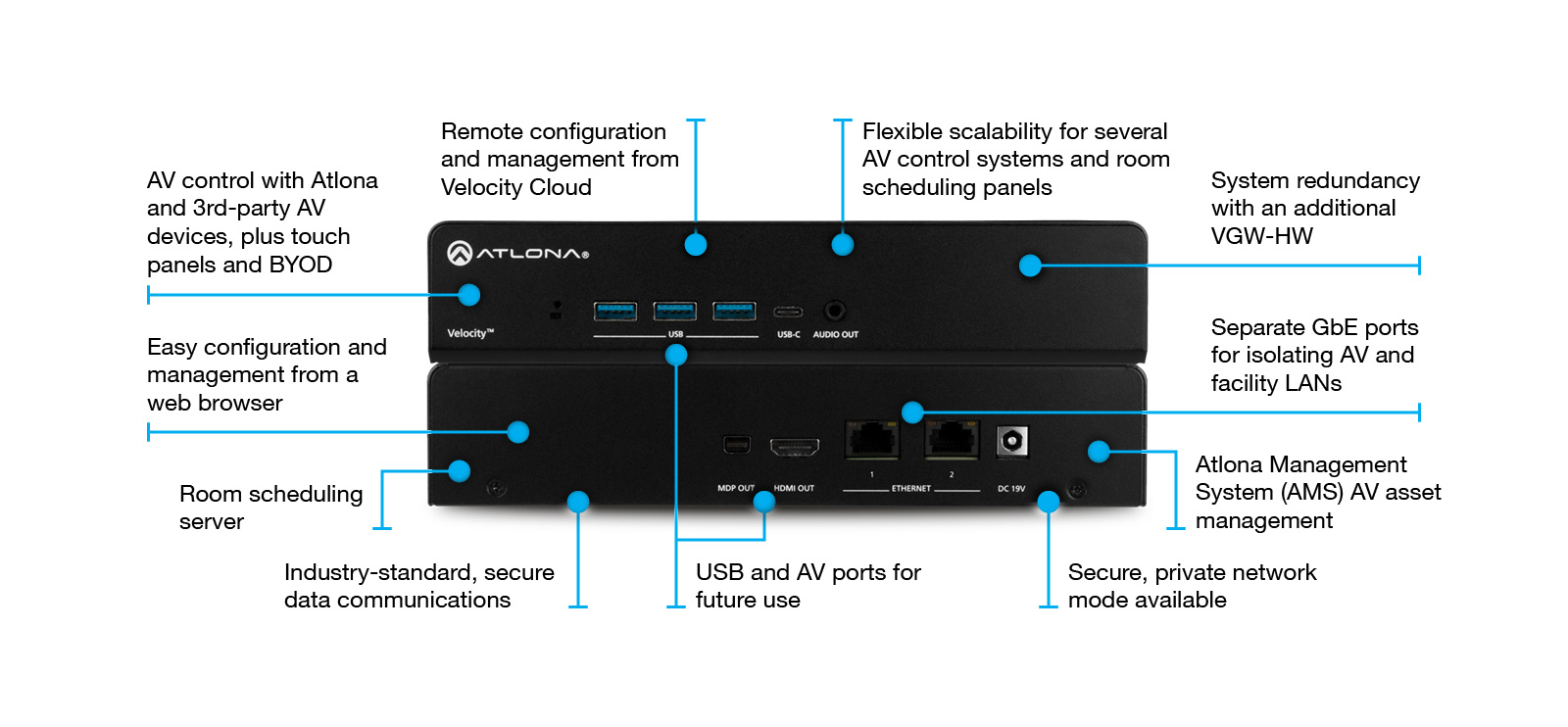
Atlona Velocity Hardware Gateway AT-VGW-HW-3 provides AV system control, plus room scheduling and AV asset management, and the Velocity System 7″ VESA Mount Touch Panel is designed for both AV control and room scheduling applications.
Atlona Velocity and Vesa touch panel
Optimized for video distribution over GbE infrastructure, deliver the highest quality 4K imagery with extremely low latency to video walls with the Atlona AT-OMNI-121 networked AV decoder featuring the advanced VCx™ codec which delivers artifact-free image presentation, ultra-fast switching, and ultra-low latency. Pair with AT-OMNI-111 AVoIP Encoder. For more insights, check out the Atlona AVoIP in Education and Esports case study.

Esports is a Growing Industry

These technologies are essential to creating an immersive and professional Esports environment on campus, elevating both player performance and viewer engagement.
SONY - Esports - Exertis Almo Webinar

As noted by rAVe in this 2024 “Esports and ProAV“ webinar description, “Virtually every college and university in North America is exploring ways to incorporate Esports on their campuses. Over 75 colleges in the USA already recognize it as a Division 1 sport. Moreover, the International Olympic Committee is considering its inclusion in the 2028 Los Angeles Olympics.”

Esports on college campuses is not just a trend—it’s an evolving industry that demands sophisticated Pro AV solutions. From displays and audio systems to live streaming setups and control systems, the right technology ensures a seamless and engaging experience for players, spectators, and broadcasters alike.

By partnering with a trusted AV distributor like Exertis Almo, integrators can confidently deliver solutions for campus gaming centers as well as meet the high standards of collegiate Esports, positioning their clients at the forefront of this dynamic market.

Ready to level up your next Esports installation? Contact us today to explore how we can help bring your vision to life.

Want to know more about AV tech for education? Check out “Audio-Visual Trends in Higher Education That Elevate the Learning Experience“.

Audio-Visual Trends in Higher Education That Elevate the Learning Experience

PanaAs the landscape of higher education evolves, so does the role of audio-visual technology in shaping learning environments for in-person and remote students. Let’s explore the top 5 trends that are revolutionizing AV in higher education institutions – and the solutions that help create a more accessible and inclusive learning space.

1. Interactive and Collaborative Learning

Interactive and engaging learning experiences are increasing in popularity among colleges and universities, and AV technology is rising to meet this demand. Interactive displays, touchscreens, and collaboration tools are transforming traditional classrooms into dynamic hubs of innovation. These spaces empower students to actively participate in their education, fostering collaboration, critical thinking, and creativity.

Projection Technology
Create engaging and collaborative learning environments with projection technology from Epson. With support for easy reading, instruction, and communication, BrightLink ensures that all students are included while bringing classrooms to life with efficient collaboration. Explore the BrightLink 760Wi Interactive Projector and the Pro 1485FI Interactive Projector for details.

Yealink - MeetingBoard touch displaysInteractive Displays
Designed to increase productivity and participation, interactive touch displays allow for effortless collaboration. Featuring a built-in camera and premium audio, Yealink’s MeetingBoard and MAXHUB’s ViewPro Series simplify classrooms and workspaces for immersive hybrid instruction.

2. Flexible Environments and Multi-Use Spaces

The shift towards flexible learning environments is reshaping the physical layout of classrooms and lecture halls in higher education. AV technology plays a crucial role in creating adaptable spaces that can easily accommodate different teaching styles and activities. Wireless presentation systems, movable furniture, and modular AV setups enable educators to customize the learning experience to meet the needs of students.

Many universities have several multi-use spaces throughout campus, and these areas require versatile technology. Higher education spaces will often use libraries for events, lecture halls for guest speakers, and cafes and study spaces for small-scale performances and entertainment.

Sennheiser G4 300 SeriesAudio Solutions
During lectures and events, microphone systems help amplify the presenters for better engagement from in-person and remote participants. Top of the class in education, Sennheiser’s G4 300 Series Wireless handheld base set is the best choice if you need a handheld transmitter and maximum flexibility.

[For insights into audio design for challenging multi-use spaces, check out “The Dreaded Gymcafatorium: 3 Keys to Successful Multi-Use Audio Design” with Tom Kehr.]

Epson large venue projectorsSpace-Saving Projection
Epson’s line-up of large venue projectors are an ideal choice for multi-use spaces, featuring larger-than-life images and simple installation. For rooms with limited space, the Epson laser projectors transform virtually any flat surface into a display for learning and collaboration, without taking up any space when not in use.

Portable and easy to set up in any space, Panasonic’s PT-LMW420U portable projector will help elevate communication quality with crisp, detailed images that stay clearly visible in well-lit rooms. Plus, Panasonic projectors are so intuitive they can work with the software and hardware you already have and don’t require you to be a projection expert to use them.

AV Furniture to Setup Anywhere
Legrand-AV mounts screensAV systems must also be flexible to be able to handle constantly changing classroom needs to fit hybrid, hyflex, in-person and distance learning styles, often all in the same day. The Da-Lite Tensioned Advantage electric projection screens with SightLine elevate room aesthetics and simplify setup for flexible mounting in a variety of room sizes and ceiling heights.

Colleges and universities are embracing AV trends in digital signage now more than ever as a key element of their essential information-sharing and messaging plans for reaching everyone on campus. Whether it’s a mobile cart, floor stand, or kiosk, Legrand-AV offers the flexibility to move and place digital signage where it’s needed.

3. Assistive Listening for Inclusivity and Accessibility

assistive listening systemTechnology that promotes inclusivity and accessibility is paramount in education spaces, as it ensures that each student has the opportunity to learn and thrive. Incorporating assistive listening technology is crucial, as it ensures that each individual can fully participate in classroom discussions and activities, fostering equal access to educational opportunities for all students.

Perfect for venues with a capacity of up to 100 people, the the LS-57 Advanced Level II Stationary RF System from Listen Technologies broadcasts a strong, reliable RF to ensure the best possible listening experience for everyone.

4. Lecture Capture and Streaming for HyFlex Learning

In an era of digital learning, lecture capture technology has become a cornerstone of higher education institutions. AV systems equipped with lecture capture capabilities enable educators to record and archive lectures for on-demand access by students. This flexible learning model empowers students to review course materials at their own pace, reinforcing learning outcomes and accommodating diverse learning styles.

PTZOptics Move 4K cameraAuto-Tracking Capabilities
Engineered to simplify the hybrid learning process, auto-tracking cameras are a great option to ensure that students can always see the professor during the lecture. The Move 4K is the latest PTZ camera from PTZOptics, featuring auto-tracking for a more intelligent video production workflow. The Move 4K is capable of 4K at 60fps (1080p at 60fps over SDI), future-proofing your technology investment while still accommodating HD and Full HD video resolution equipment.

Lecture-Capture Solutions for the Classroom
In modern classrooms, lecture capture is essential to create an inclusive learning experience for each student. Additionally, many courses are now asynchronous, requiring a professor to pre-record the lecture material and upload for the students’ review.

Panasonic’s LCS-100 lecture capture appliance integrates with the ATS-200 / ATS-400 auto-tracking servers, and PTZ cameras with voice-triggered presets using Panasonic Pro Audio, including ceiling microphones, gooseneck and boundary microphones, and more.

The LC200 CaptureVision System from Lumens is an all-in-one media station that allows instructors to easily mix video and audio sources while streaming and recording lectures for engaging and attractive presentations.

5. AI-Powered Tech and Data for a Personalized Experience

AVer VB130Advancements in artificial intelligence (AI) are reshaping the landscape of higher education by enabling personalized learning experiences for each student. AI-powered analytics tools analyze student data to identify learning patterns, preferences, and areas for improvement. With this insight, educators can tailor instruction to meet the unique needs of each student, fostering deeper engagement and academic success. Here are a few key solutions to create a personalized experience for students:

AVer’s VB130 is a powerful, all-in-one hybrid learning tool featuring 4K video and built-in audio for an exceptional student experience. With advanced AI and SmartFrame technology, the videobar keeps the professor in camera view while focusing on their voice so students do not miss any content.
Designed for remote teaching rooms, Yealink’s A20 + CTP18 is equipped with AI technology, including auto-framing and speaker tracking, allowing instructors to create a vivid classroom experience without restricting movement.

Summing It Up

The future of higher education is bright with possibilities, thanks to the transformative power of audio-visual technology. As institutions continue to embrace these solutions and trends, we’re excited to partner with you in delivering innovative products that elevate learning experiences and empower students in the classroom and online.

Ready to embark on your AV journey?
Reach out to us today to explore how Exertis Almo can help you harness the power of technology to transform your educational projects.


Pin It on Pinterest