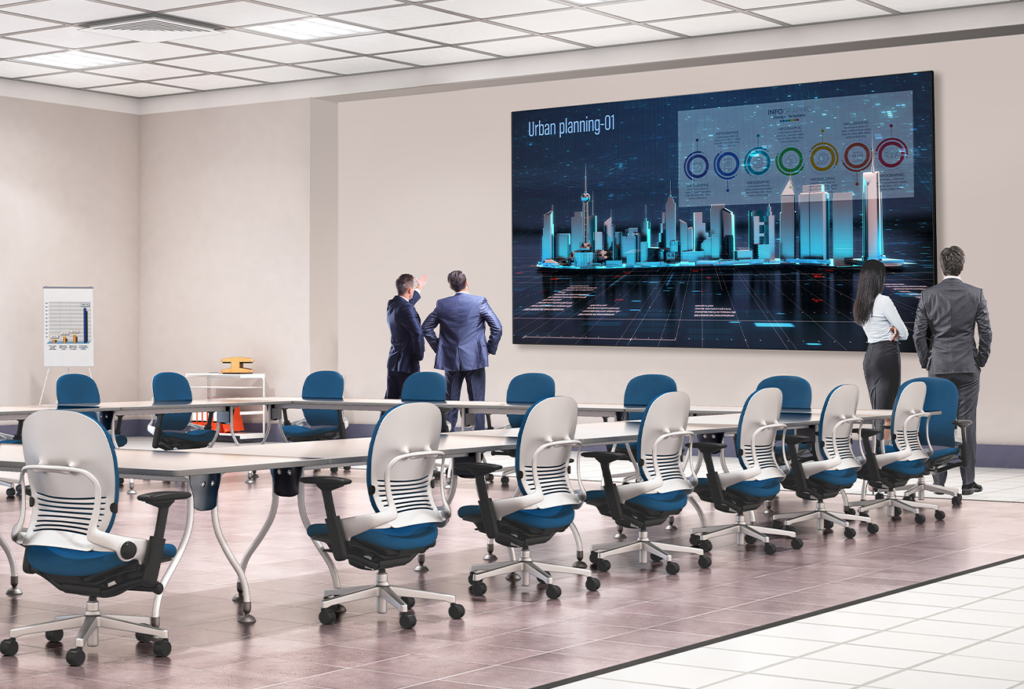
Optimizing AV Systems for Hybrid Classrooms: Best Practices for Integrators

The hybrid classroom, where in-person and remote learners connect seamlessly, is now a staple in education. With 67% of college instructors leading hybrid classes in 2023 (up from 52% before the pandemic), this approach is expected to continue growing across K–12 and higher education. As an AV integrator, you’re already aware that a well-designed AV system is key to engaging every student equally. Here’s how to tackle that challenge with confidence.

  1. Prioritize High-Quality Cameras & Flexible Coverage

Opt for PTZ (Pan-Tilt-Zoom) cameras instead of fixed-lens models. They allow remote students to follow the instructor and classroom activity seamlessly. Lumens even suggests avoiding fixed lenses for multipurpose rooms due to their limited coverage.

Best practice suggestions:

    • Choose auto-tracking cameras for hands-free presentation.
    • Allow remote focus and zoom control via a secondary display or control console.
  1. Important: Don’t Allow Poor Audio to End the Class

Clear and intelligible audio is the foundation of effective hybrid learning. Ceiling mounted beamforming microphones, conferencing soundbars, and digital signal processors with (AEC) acoustic echo cancellation are just a few of the possible solutions used to ensure the class sounds as good as it looks.

Best practice suggestions:

    • Consider lapel mics for presenters and ceiling or table mics for students to stay loud and clear. Microphones are just as important as the loudspeakers being used.
    • Route audio through a central DSP with dynamic equalization, feedback suppression, and AEC (acoustic echo cancellation) to help balance out the sound and ensure no unwanted feedback/echo.
    • Room acoustics matter.  Taking into consideration the possible obstacles of reflective surfaces, open ceilings, and unwanted noises in the room will go a long way to stellar performance.
  1. Upgrade Displays and Sharing Infrastructure

Dual displays, one for content, another for live video feed, help both in-room and remote participants stay engaged. Having the right size displays will ensure everyone in the room can clearly view what is being shown. Interactive whiteboards also boost collaboration, allowing annotations and media sharing in real time.

Best practice suggestions:

    • Use interactive touch screens, or interactive projectors.
    • Consider industry standards when it comes to the recommended display size for a given space.
  1. Fortify Network Reliability

A strong network is non-negotiable. Hybrid systems demand reliable bandwidth and proper Quality of Service (QoS) prioritization to avoid audio dropout or video lag.

Best practice suggestions:

    • Validate network health before installation.
    • Create separate AV VLANs to isolate traffic and maintain stability.
    • Ensure Wi-Fi strength supports classroom needs effectively.
  1. Integrate Seamlessly with LMS and Collaboration Platforms

Ease of use for educators is essential. Sick of manual setup? So are teachers. Make sure your AV design integrates smoothly with platforms like Canvas, Blackboard, Zoom, or Microsoft Teams.

Best practice suggestions:

    • Test both live streaming and on-demand delivery.
    • Tie AV controls into existing classroom software wherever possible.

Why This Matters

Hybrid learning isn’t just a trend. It’s backed by data: over two-thirds of educators now embrace it. When AV systems falter due to poor audio, unreliable cameras, lagging video, remote learners disengage. Your expertise in deploying smart, integrated AV systems can ensure every voice is heard and every lesson matters.

Final Take

By implementing PTZ cameras, dependable audio, dual-display systems, robust networking, and smart integrations, you’ll deliver hybrid environments that feel inclusive, intuitive, and professionally engineered. For AV integrators who stay ahead of these practices, the payoff is improved learning outcomes, and stronger client trust.

Ready to upgrade your hybrid classroom AV? Connect with your Almo team for a free consultation on your next project.

Why Resellers Should Take Advantage of Project Registrations

Let me ask you if you’ve ever experienced this scenario: you’ve been working on a project, specifying every detail and researching and locating the products to meet the project requirements. You’ve quoted the client, and you’re waiting on funding or their next signature. The buyer receives the information, and you learn that they placed the order with another supplier due to lower cost.

Unfortunately, I’ve had that experience with over 25 years in this industry. I want to provide you with a recommendation designed to help minimize these scenarios for the future.

One of the most powerful, and often underutilized, tools available is project registration.

What is project registration?

Project registration is a process that allows a reseller to inform manufacturer (leveraging your Almo team) about a specific opportunity or project. This process provides numerous benefits to both the reseller and the manufacturer, including transparency, pricing protection, forecast of needed products and more.

Let’s dive into the benefits of registering your projects.

Why does project registration matter?

First and foremost, project registration is a simple and effective way to protect your profit. When a project is registered, you’re able to secure your pricing and provide yourself the opportunity to make more margin.

James Calandrillo, Vice President of Almo Pro AV Sales, detailed the importance of project registration, especially with prices on the rise.

“In today’s unprecedented times with price changes due to tariffs, it’s more important than ever to register as many projects as you can, as often as you can,” he explained. “And as pricing changes, active registrations are covered to the end of that, whereas there’s no pricing guarantee if you don’t register the project.”

When you register a project, you’re not just receiving reliable pricing, you’re creating awareness about the intricacies of your project with the manufacturer utilizing your Almo team. Consider it a win for both the reseller, distributor and the manufacturer. The reseller enjoys pricing recognition provided from the manufacturer while both the distributor and manufacturer gain knowledge their products for future forecast.

Taukia O’Donnell, Director of Bid Operations at Almo Pro AV, provided additional details on the importance of project registration in a recent conversation.

“Project registration is a critical tool that empowers resellers to maximize profitability and strengthen partnerships with manufacturers,” she explained. “This not only safeguards margins but also fosters transparency, enabling manufacturers to better understand project needs and market demands.”

Along with pricing recognition, project registration separates the reseller from a simple box sale. Instead, they’re viewed as an actual design-build integrator.

“Project registration elevates resellers from mere transactional vendors to strategic design-build integrators,” Taukia said. “This distinction enhances credibility and deepens manufacturer relationships, creating a competitive edge.”

“If you’re registering projects, it shows the manufacturer that you’re really doing the work,” James added.

Why should resellers leverage Almo for support?

Oftentimes, sales representatives choose not to register their projects simply because they don’t have the time to do it. When dealing with a variety of brands, they don’t have the bandwidth to reach out to vendors themselves and explain their plans.

“Partnering with Almo Pro AV simplifies the process, offering expertise and access to multiple vendors who support registration at low quantities,” explained Taukia. “This support is invaluable for sales teams managing diverse brands under tight schedules.”

Along with expertise, Almo Pro AV is here to ensure an efficient registration process.

“I encourage all resellers to prioritize project registration to protect profits, streamline operations, and position themselves as trusted partners in the supply chain,” said Taukia. “Leveraging Almo’s resources can make this process seamless and highly rewarding.”

I realize we are all very busy, our time and resources are limited. This is definitely one area to take the extra few minutes to register your projects when you’ve spent time to specify the project for your client.  It’s like offering yourself a little added protection from the “last minute low-ballers”. I’m not saying you will do away with the competition, however this process will definitely assist in minimizing the risk for you.

The project registration process is usually quite easy – simply provide the details to your Almo Sales Rep and they will work directly with the manufacturer utilizing Almo’s Bid Registrations. Your Almo sales representative will be happy to assist you in collecting the information to register your projects.

If you have any questions or would like to request to have a project registered on your behalf, please reach out to Almo Sales or myself for assistance.

Angie Greene
About the Author

Angie Greene | DSCE

Business Development Manager

Supported Manufacturers: Panasonic Connect

AKG Wireless Microphones – An Overview

AKG Wireless Microphones

Selecting a wireless microphone system can be an intimidating experience. The amount of choices, configurations, and specifications available can be dizzying, even for those of us with experience in the industry.

Thankfully, AKG makes a wide range of high-quality wireless microphone systems to fit any application and budget, and once you know the major differences between them, you’ll be able to select the right product for your project in no time.

AKG wireless microphone systemWhat’s the Use (Case)?

Perhaps the most important consideration in selecting a wireless microphone system is where and how it will be used. Is it for a professional stage or broadcast environment where sound quality and reliability are paramount? Or is it for the lead singer for a local cover band where the highest quality for a limited budget is the key factor? Is it for a corporate or government environment where the signals may need to be encrypted to remain confidential? Identifying the needs of your end-user is the first step to determining which system is right for you.

Changing Channels

Another primary consideration is the number of simultaneous channels you will need at a particular location, as well as the amount of other wireless signals in the area. Professional touring environments may require as many as 40-50 open wireless channels (think stadiums, Broadway shows, large houses of worship), whereas a simple fitness studio may only require one or two. The ability to have a large number of simultaneous wireless channels running at the same time is a key differentiator in cost when it comes to wireless systems.

If you are installing the system in an area where there might be a considerable amount of wireless interference, such as a campus or dense urban environment, having a wide frequency range and the ability to easily identify clear frequency bands should be a prime consideration.

Digital vs. Analog

Newer digital wireless systems offer better audio quality and the ability to encrypt the signal for better security, but operate in the 2.4 GHz band, which is also where omnipresent WiFi and Bluetooth signals reside, so in dense commercial environments they may not be the best choice. Although analog RF-based systems operate on older technology, they are still the preferred choice for professional broadcast and live event systems.

So which AKG wireless system is right for you? Let’s take a look at their entire range and their pros and cons:

AKG WMS 40 MINI

AKG’s WMS 40 MINI series offers incredible value for the money. These are simple-to-operate, single-channel fixed-frequency systems which offer plug-and-play setup and a small form factor.

AKG PERCEPTION WIRELESS

The Perception Wireless series is an excellent choice for simple small-scale systems with a tight budget. It is an analog UHF-based system with basic frequency selection ability.

AKG WMS420

The most cost-effective professional system in the AKG range, the WMS420 offers a wide frequency selection band, detachable antennas to allow remote mounting, and rechargeable transmitters.

AKG WMS470

The WMS470 series is the best choice for a cost-efficient, high-performance, multi-channel system. Rechargeable batteries can be used and charged while remaining in the transmitter using the optional CU400 stand charger. The rear-mounted antennas can be detached for remote mounting.

AKG DMS100 & DMS300

The DMS100 and DMS300 systems are professional digital wireless systems from AKG, which offer pristine 24-bit/48 kHz audio and AES 256-bit encryption operating on the digital 2.4 GHz platform and are an excellent entry point to the world of digital wireless. The primary difference between the DMS100 and DMS300 is the simultaneous channel count – DMS100 allows up to (4), and the DMS300 allows up to (8).


AKG DMS800

The DMS800 is a reference professional-level digital wireless system designed for theaters, live productions, and tour sound applications. It offers the most accurate and reliable signal transmission in their digital line, and can be remotely monitored by Harman software.

AKG WMS4500

AKG’s flagship analog wireless system, the WMS4500, offers the highest channel quantity – up to (70) simultaneous channels, maximum reliability, and ultimate audio quality. Designed for touring sound, live performances, and broadcast applications, it is the system by which other AKG wireless systems are measured.

Conclusion

AKG offers a fit for every price point and project need. All of the above systems are available in a number of different configurations, with different transmitter options such as handheld, instrument, lavalier, and head-worn versions.

And don’t worry, if you still need assistance in selecting the appropriate AKG wireless system for your project, the Audio Team at Almo ProAV is here to help any time, at [email protected].

Audio enthusiast? Check out “Visiting the JBL Experience Center“.
John Rossman - headshot-frame

About the Author

John Rossman | CTS

BDM II – Technical Specialist

Supported Manufacturers: Harman ProfessionalAKG, AMX, BSS, Crown, DBX, JBL, Lexicon, Martin, & Soundcraft

Modern AV – Throwaway Living

In August of 1955, LIFE magazine ran an article in their Modern Living section called, “Throwaway Living: Disposable Items Cut Down Household Chores”.

The picture associated with the piece shows dozens and dozens of household items and claimed that the objects shown represented 40 hours to clean.  Another picture in the article shows a single-use barbeque grill with stand, asbestos shell, wire grille and enough charcoal to last one hour.  Maybe not everything convenient is a good idea.

Eventually it was discovered that throwing everything away and filling up landfills was not a good long-term strategy – imagine that.

The first Ecology symbol that I recall came about in 1969, and in 1970 we had our first Earth Day.  I’m also old enough to remember the early days of Mother Earth News and the Whole Earth Catalog.

Today we talk about fighting pollution and environmental destruction with recycling, reuse and reclamation.

A few weeks back, I was doing some web searching into audio consoles and I found a comment about how that one brand was so cheap that they budgeted for two, one to use and a second as a backup for when the first one failed.  This was because of the brand’s notoriety for lack of quality, support and service.

Recently I had a request for eight wireless microphone channels.  A popular online shopping site shows an eight-channel system at $34.99 per channel.  That’s not a typo.  $34.99 per channel.  By comparison, Ronco’s Mr. Microphone was $12.88 back in 1978.  $12.88 in 2025 dollars is $63.82.  Today, Mr. Microphone would be almost twice as expensive per channel than the new online offering.  At these price points, equipment has no real value and not even worth the attempt to repair if, actually when, it fails.  We just throw it away and get another one.

Like Marty McFly, we’re all back to living like we’re in 1955 except in our Throwaway Society, we’re tossing electronics, appliances, tools and even cars away like they’re paper plates and plastic utensils.

Think about it – what can we buy today that will provide a lasting value for years to come?  We used to call them Durable Goods and it’s a real economic category.  The Durable Goods subcategory of Electronics includes TVs and computer equipment.  The items in that category should probably be updated, as seeing a modern TV or a computer as a “durable good” is hard to fathom.

A true durable good was the old refrigerator that you had in your house in the ’60s and early ‘70s that came in Harvest Gold, Avocado or Burnt Orange that would live forever.  You may still have one as your garage fridge.

In our world of AV, what product or signal transport can you spec in a project today that will still be relevant five years from now?  Is any piece of modern AV equipment a durable good?  Perhaps a good hardwired microphone or a quality loudspeaker, but that’s it.

sustainable AVWe’re often working with refresh cycles of five years, and I’ve seen articles where the IT refresh cycle is two to four years.  People on average keep a phone 2 ½ to 3 ½ years and a car for eight.

Imagine if all of the things around your house had to be replaced every five years: lawn mowers, refrigerators, washing machines, lamps, bicycles, roofs, windows, electrical panels and wiring, plumbing, etc.  It seems crazy, but we’re replacing AV equipment and the connecting infrastructure regularly to stay current with the technology.

Current with what?  It’s not just the ever-increasing resolutions and the bandwidth required to support the higher resolutions.  I would argue that it is in large part due to the plethora of proprietary signal interfaces and protocols that we have.

HDMI with HDCP was forced upon us from the Consumer world and HDBaseT made it possible for us to extend HDMI in our Pro world.  Unfortunately, one manufacturer’s HDBaseT may not work with another manufacturer’s HDBaseT and it has always been that way.

So maybe we use a different signal type.  Maybe we use SMPTE ST 2110 or one of the SDIs.  Maybe we “simplify” and go AVoIP.  With AVoIP we can choose from Dante, SDVoE, NDI, IPMX, SRT or one of the manufacturer’s proprietary AVoIP transport protocols.

Or worse, let’s see if we can just use HDMI or DisplayPort on the USB-C connection.

Do you see part of the problem yet?  Although AVB/TSN (Audio Video Bridging/Time Sensitive Networking) promised to bring us signal transport’s version of World Peace, that was over 20 years ago.  AVB/TSN had its challenges, so everyone continued to do their own thing.  From an Alliance or manufacturer’s viewpoint, I get it – who doesn’t want to try and rule the transport world?  But in the long-term, is this wise from a client and sustainability perspective?  Moreover, how long do we think we can maintain all these separate protocols?  We are working with built-in incompatibility and obsolescence.  What if our IT compatriots say, “Enough of all this incompatible nonsense and proprietary transports” and decide for us what we’ll be using.  It’s all on the network, right?

Broadcast and Production have been using NDI, ST 2110 and IPMX in their IP-based workflows and we’re already using conferencing cameras equipped with these protocols as we seek to emulate more of a production experience.  As more of our regular conferencing and streaming looks more like a production, perhaps one of these will become our default but that still doesn’t solve the video protocol coming out of a computer.

In a perfect world, I’d like to see a single interoperable Ethernet AVoIP protocol built into every computer, AV signal source and AV signal destination.  No more separate transmitters, receivers, encoders or decoders.  Configuration so simple that even a cave man can do it.

“So if AV is nothing but an endpoint, where does that leave us in the Pro AV world, Tom?”  It leaves us where we should be: Experts on the communication environment.  Realistically, this is where our true value resides – the crafting of the environment wherein humans can communicate effortlessly.

We spend so much time on signal extension and transport that we don’t have the time to work properly with the client on optimum image sizes, sightlines, content, lighting, interior design, furniture layouts, acoustics, microphone locations, loudspeaker coverages and intelligibility – all the necessary factors that contribute to a better overall communication implementation.

As I see it, the bottom line is that at some point, AV manufacturers will all need to learn to get along with one another for true interoperability – for our sakes as well as the end users and for the planet.

There is the SAVe organization that seeks to bring AV stakeholders together to take action to achieve the 2030 Sustainable Development Goals (SDGs).  A big part of SAVe’s focus is to provide ways that companies can be more responsible in terms of reusing, repurposing, recycling and disposing of AV equipment.  Get to know them at https://saveav.org/

In the meantime, reach out to us here at Almo Pro AV.  We’ll do our best to help you craft solutions that will work best for your clients not only now, but as best we can, in the future.

Tom Kehr
About the Author

Tom Kehr

CTS-D, CTS-I, Network+, LEED Green Associate, ISF-C, ATD Master Trainer

In-House System Designer and Trainer

Supported Applications: System Design

Almo ProAV’s in-house system design experts have you covered with tools to deliver impeccable visual and sound experiences. Whether you’re working with a screen, flat panel, or LED wall, or even designing a sound system, the tools below will help you answer questions such as:

  • How big does an image need to be?
  • Where should the viewers be located in relation to that image?
  • Will my sound reinforcement system be free from feedback?

Check out the Almo Pro AV Calculator Tools developed by Tom including:

  • Basic Decision Making (BDM)
  • Analytical Decision Making (ADM)
  • Potential Accoustic Gain (PAG) – Needed Accoustic Gain (NAG)
  • General Calculator & Converter
  • Ceiling Loudspeaker Design

How Lunar New Year Can Impact Product Timelines in Hospitality Spaces

How Lunar New Year Can Impact Product Timelines in Hospitality Spaces

In the hospitality industry, timing is everything. Whether you’re refreshing guest rooms, outfitting common areas, or enhancing outdoor spaces, project deadlines often align with seasonal demand and guest expectations. Meeting those deadlines requires careful planning, strong vendor relationships, and an understanding of potential challenges that may impact supply chains along the way.

One often-overlooked factor is the Lunar New Year holiday, which has a significant impact on global supply chains. You’ve likely experienced a slowdown in those supply chains while supporting projects in hotel spaces. While many are familiar with Lunar New Year as a cultural celebration marked by family gatherings, festivals, and traditions, its effect on business operations is sometimes underestimated, especially in industries like hospitality, where projects depend on tight schedules.

What is Lunar New Year?

As the most widely celebrated holiday in China, the Lunar New Year marks the start of the lunar calendar. While festivities traditionally last 15 days, factory closures and slowdowns can stretch over several weeks as workers travel to be with family. In 2026, the official holiday in mainland China will run from February 15–22, followed by the Lantern Festival on March 3.

What This Means for You

Shipping FacilityIf your projects rely on products manufactured in Asia, or components sourced from the region, these closures can mean longer lead times, shipping backlogs, and even rushed orders with compromised quality. The impact doesn’t stop there. Logistics, customs, and freight forwarding also experience congestion after the holiday, which can create ripple effects that push deliveries even further.

If your product manufacturer is in Asia or sources components from there, you can expect longer turnaround times. Additionally, there is the potential for rushed orders with compromised quality, expedited shipping fees and storage costs, and staffing gaps following the break.

  • Production Delays: Factories may close for 2-4 weeks, halting or delaying manufacturing.
  • Shipping Backlogs: Orders submitted too close to LNY often get pushed behind once production restarts.
  • Extended Lead Times: Even after reopening, it can take weeks for operations to return to normal.
  • Ripple Effects: Logistics, customs, and freight forwarding also experience congestion, further slowing delivery.

For hotels and resorts working toward openings, renovations, or seasonal updates, a delayed furniture shipment or lighting fixture could push back completion, preventing the space from being guest-ready at peak season. Outdoor product delays can impact poolside furniture or patio areas just as warmer weather approaches. These disruptions don’t just affect aesthetics, they can influence guest experience, revenue opportunities, and brand perception, putting critical timelines at risk, which makes proactive planning essential.

Customer SupportHow Almo is Here To Help

Here’s the good news: by partnering with Almo, we’ll help ensure that your projects stay on schedule, especially when global supply timelines are compromised. Our strong vendor relationships, advanced planning tools, and product availability strategies help minimize the risks associated with supply chain slowdowns during Lunar New Year.

  • Spot potential delays ahead of time: We’ll review your upcoming projects to identify which SKUs or product lines are most likely to hit a delay window.
  • Stay in the loop: We’re already talking to the manufacturers. We’ll keep you informed as shipping updates, cutoff dates, or allocation news comes in.
  • Look for alternatives: If something has a long lead time, we can help you find comparable options.
  • Secure key products: If something is critical to your project, we’ll help you secure stock of pre-plan allocations.
  • Leverage our distribution support: We’re here to help you secure inventory and manage logistics.

It’s easy to push these conversations off until you’re placing orders, but by then, timelines are already tight. If you have hospitality projects coming up in early 2026, we’ll help you build a plan that avoids delays and keeps your projects moving.

Planning Ahead Makes All the Difference

Waiting until the last minute to consider the Lunar New Year’s impact can put hospitality projects at risk. If you have renovations, openings, or seasonal updates planned for early 2026, starting your planning now is essential. By identifying potential delays, securing key products, and exploring alternative solutions, you can maintain your timeline and ensure guest-ready spaces.

With Almo’s support, hospitality teams can anticipate supply chain challenges, minimize disruptions, and keep projects on schedule, all while maintaining high standards of quality and service.

Connect with us today to start planning your project timeline and avoid Lunar New Year delays.

Plug-and-Play AV: The Fast Track to Smarter Collaboration Upgrades Before Year-End

The clock is ticking on year-end budgets, and for many corporate clients, that means finding smart ways to maximize remaining funds without adding complexity. Enter plug-and-play AV solutions: the ultimate shortcut to collaboration upgrades.

What Does Plug-and-Play AV Really Mean?

In simple terms, plug-and-play AV is all about simplicity, speed, and scalability. These solutions are designed to work right out of the box – no lengthy configuration, no specialized programming. For integrators, that translates into faster deployments and fewer headaches. For clients, it means immediate ROI and minimal disruption to daily operations.

Why It Matters for Corporate Spaces

Hybrid work isn’t going anywhere. Teams need tools that make collaboration seamless whether participants are in the room or remote. Plug-and-play AV solutions deliver exactly that:

  • Ease of use: No IT degree required – employees can walk in and start collaborating.
  • Flexibility: Works across multiple platforms and spaces, from huddle rooms to boardrooms.
  • Scalability: Start small and expand as needs grow.

Popular Solutions to Consider

MaxHub collaborationHere are a few examples of plug-and-play options that integrators are leveraging to help clients upgrade quickly:

  • Wireless Presentation Systems: Tools like Barco ClickShare Hub Core make sharing content effortless – no cables, no confusion.
  • USB Conferencing Kits: Solutions such as the Maxhub XCore Kit for Teams or Huddly L1 Kit deliver high-quality video and audio without complex installs.
  • Smart Cameras and Video Bars: Products like Jabra PanaCast 40 VBS enhance hybrid meetings with intelligent framing and crystal-clear sound.
  • Network Optimization: Don’t forget the backbone – switches like Netgear M4250 ensure AV-over-IP runs smoothly.

Why Act Before Year-End?

There’s a strategic advantage to moving now:

  • Budget Efficiency: Many organizations have funds earmarked for technology upgrades and must use them before they disappear.
  • Immediate Productivity Gains: Faster deployments mean teams start benefiting right away.
  • Future-Proofing: These solutions position clients for success in 2026 and beyond.

Bottom line: Plug-and-play AV isn’t just a trend – it’s a practical way to deliver value quickly. As an integrator, helping clients make these smart upgrades now can strengthen relationships and set the stage for continued growth.

Want help finding the right solutions for your projects?
Reach out to your Almo sales representative or business development manager. We’re here to make the process simple and stress-free. Start the conversation with our team ⟫

Pin It on Pinterest