Optimizing AV Systems for Hybrid Classrooms: Best Practices for Integrators
The hybrid classroom, where in-person and remote learners connect seamlessly, is now a staple in education. With 67% of college instructors leading hybrid classes in 2023 (up from 52% before the pandemic), this approach is expected to continue growing across K–12 and higher education. As an AV integrator, you’re already aware that a well-designed AV system is key to engaging every student equally. Here’s how to tackle that challenge with confidence.
- Prioritize High-Quality Cameras & Flexible Coverage

Opt for PTZ (Pan-Tilt-Zoom) cameras instead of fixed-lens models. They allow remote students to follow the instructor and classroom activity seamlessly. Lumens even suggests avoiding fixed lenses for multipurpose rooms due to their limited coverage.
Best practice suggestions:
-
- Choose auto-tracking cameras for hands-free presentation.
- Allow remote focus and zoom control via a secondary display or control console.
- Important: Don’t Allow Poor Audio to End the Class

Clear and intelligible audio is the foundation of effective hybrid learning. Ceiling mounted beamforming microphones, conferencing soundbars, and digital signal processors with (AEC) acoustic echo cancellation are just a few of the possible solutions used to ensure the class sounds as good as it looks.
Best practice suggestions:
-
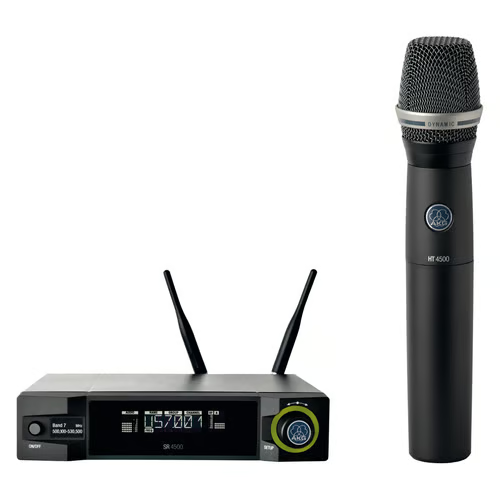
- Consider lapel mics for presenters and ceiling or table mics for students to stay loud and clear. Microphones are just as important as the loudspeakers being used.
- Route audio through a central DSP with dynamic equalization, feedback suppression, and AEC (acoustic echo cancellation) to help balance out the sound and ensure no unwanted feedback/echo.
- Room acoustics matter. Taking into consideration the possible obstacles of reflective surfaces, open ceilings, and unwanted noises in the room will go a long way to stellar performance.
- Upgrade Displays and Sharing Infrastructure

Dual displays, one for content, another for live video feed, help both in-room and remote participants stay engaged. Having the right size displays will ensure everyone in the room can clearly view what is being shown. Interactive whiteboards also boost collaboration, allowing annotations and media sharing in real time.
Best practice suggestions:
-
- Use interactive touch screens, or interactive projectors.
- Consider industry standards when it comes to the recommended display size for a given space.
- Fortify Network Reliability
A strong network is non-negotiable. Hybrid systems demand reliable bandwidth and proper Quality of Service (QoS) prioritization to avoid audio dropout or video lag.
Best practice suggestions:
-
- Validate network health before installation.
- Create separate AV VLANs to isolate traffic and maintain stability.
- Ensure Wi-Fi strength supports classroom needs effectively.
- Integrate Seamlessly with LMS and Collaboration Platforms
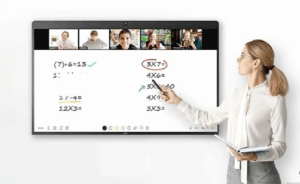
Ease of use for educators is essential. Sick of manual setup? So are teachers. Make sure your AV design integrates smoothly with platforms like Canvas, Blackboard, Zoom, or Microsoft Teams.
Best practice suggestions:
-
- Test both live streaming and on-demand delivery.
- Tie AV controls into existing classroom software wherever possible.
Why This Matters
Hybrid learning isn’t just a trend. It’s backed by data: over two-thirds of educators now embrace it. When AV systems falter due to poor audio, unreliable cameras, lagging video, remote learners disengage. Your expertise in deploying smart, integrated AV systems can ensure every voice is heard and every lesson matters.
Final Take
By implementing PTZ cameras, dependable audio, dual-display systems, robust networking, and smart integrations, you’ll deliver hybrid environments that feel inclusive, intuitive, and professionally engineered. For AV integrators who stay ahead of these practices, the payoff is improved learning outcomes, and stronger client trust.
Ready to upgrade your hybrid classroom AV? Connect with your Almo team for a free consultation on your next project.
 What’s the Use (Case)?



 Eventually it was discovered that throwing everything away and filling up landfills was not a good long-term strategy – imagine that.
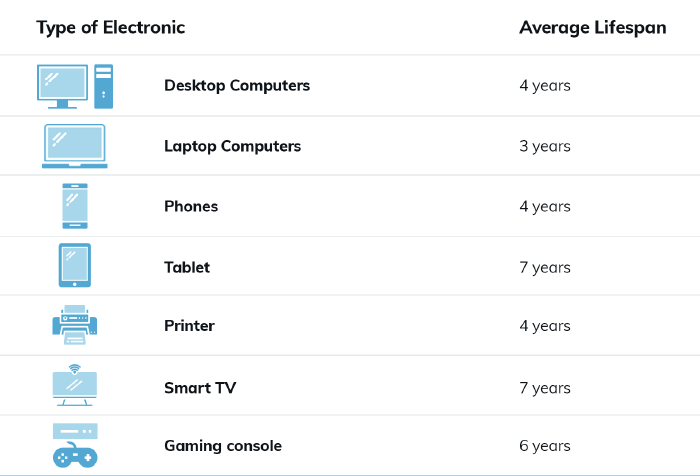 We’re often working with refresh cycles of five years, and I’ve seen articles where the IT refresh cycle is two to four years. People on average keep a phone 2 ½ to 3 ½ years and a car for eight.
 “So if AV is nothing but an endpoint, where does that leave us in the Pro AV world, Tom?” It leaves us where we should be: Experts on the communication environment. Realistically, this is where our true value resides – the crafting of the environment wherein humans can communicate effortlessly.
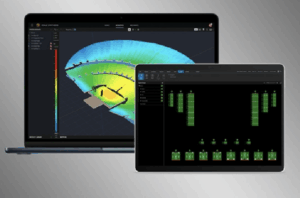 The most common use of this poor “design” philosophy seems to be in determining the appropriate number of ceiling loudspeakers for a room. It seems everyone other than an actual AV Designer guesses at the number of loudspeakers needed using the LAR method. Take for example the 40 ft. x 27 ft. room with a 9 ft. ceiling where the initial inquiry stated, “I would think a ceiling speaker on each side of the room would be sufficient.” JBL’s free DSD (
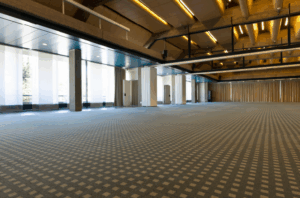 Acoustical Properties:
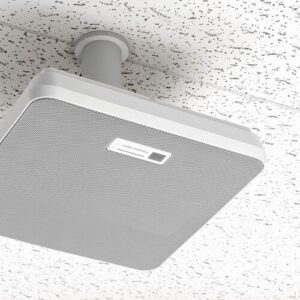 Ceiling and Wall Microphone Arrays
 Finally, for the trend that is assuredly NOT one that I hope sticks around, is the continued assault on acoustics that is modern conference room design. The aesthetics of modern conference room design seem to be engineered to be in direct opposition to what makes a room sound good.

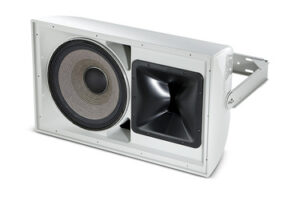 After explaining the limitations of the project, Dave surprised me when he stated that JBL’s
 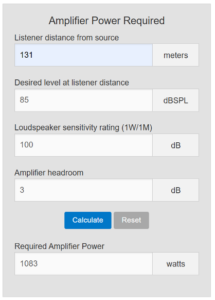 Finally, something we could work with! We settled on the Crown DCi 2×1250 to power (2) JBL AW566 loudspeakers mounted above the press box to provide sound to the visitors’ side. The home side situation was much easier to solve for – it simply required selecting speakers with the appropriate coverage patterns. Those turned out to be (3) JBL AWC82 speakers, powered by a Crown DCi 4×600. We also recommended relocating the home side speakers so that they would no longer be in the acoustic shadow of the press box roof, as the previous Community speakers were.